How CMake helps embedded teams standardize workflows across developers, operating systems, and CI/CD environments.
Every embedded team has lived the story: a vendor project file ties you to one IDE, while CI pipeline requires something else. Linux developers translating project files by hand to adopt a more script-driven workflow to escape the GUI-driven development. A new microcontroller variant that brings yet another project configuration to maintain, often in a vendor-specific format.
This friction is one of the big reason embedded development is converging towards CMake as the common language for describing how software builds. One build description, readable by IDEs, command-line tools, and CI pipelines alike, replaces a collection of configurations that slowly drift apart.
IAR has had its own project format for decades and while it remains fully supported for teams to rely on, CMake is now a first-class option across the IAR Platform. This blog follows a single firmware project from workstation to pipeline to show what that looks like in practice.
Why Are Embedded Teams Moving to CMake?
Most teams don't create build complexity on purpose. It accumulates. A new product variant needs its own configuration. A second architecture adds more project files. CI scripts start duplicating settings that already live in the IDE. Before long, several versions of what should be the same build are evolving independently.
The symptoms are familiar:
-
Project settings that must be synchronized by hand across IDE, scripts, and CI
-
Configuration drift between developers and teamsw
-
Build scripts that only work on one machine or operating system
-
A new architecture or variant requires cloning an entire project
-
Slow onboarding as the build lives partly in files and partly in someone's head
Meanwhile, the environment has changed. Builds now run headlessly on Linux, inside containers, triggered by pipelines that have never seen a desktop. A build that only exists inside a GUI project format becomes a bottleneck in that world. A text-based, version-controlled CMake description fits it naturally.
How Does CMake Handle Cross-Compilation for Embedded Targets?
Start with the part that makes cross-compilation work: the toolchain file. It tells CMake which compiler, assembler, and linker to use and which platform you're targeting. A minimal one for the IAR toolchain for Arm looks like this:
cmake
# iar-arm.cmake
set(CMAKE_SYSTEM_NAME Generic)
set(CMAKE_SYSTEM_PROCESSOR arm)
set(CMAKE_C_COMPILER iccarm)
set(CMAKE_CXX_COMPILER iccarm)
set(CMAKE_ASM_COMPILER iasmarm)
With that in place, the same project configures and builds from any terminal, on Linux or Windows:
cmake -S . -B build -G Ninja --toolchain iar-arm.cmake
cmake --build build
As the project grows, CMake's target-centric design keeps it manageable. Include paths, compiler settings, and link options are tied to targets using commands such as target_include_directories() and target_link_libraries(), propagating automatically to everything that depends on them. Generator expressions let a single CMakeLists.txt adapt to different architectures, compilers, and build types. Supporting a new core or device variant becomes a new toolchain file or preset rather than a cloned project.
Can CMake Run Your Embedded Tests?
The same build description can also drive testing. CTest is part of CMake: define a test with add_test(), and it runs through the same workflow used to build the software.
ctest --test-dir build
For IAR users, tests can go one step further and run through the C-SPY debugger, on a simulator or on target hardware. A C-SPY-aware test wrapper launches each test and detects pass or fail from its output, so CI results come from the same execution environment developers use when they debug.
As building and testing now share one common foundation, pipelines and developer's workstations now run the same steps and get the same results.
How Does the IAR Cross-Platform IDE Work with CMake?
A common question from teams considering CMake is whether they can keep their CMake project and still work productively in an IDE. With the IAR cross-platform IDE, the answer is that the CMake project stays the source of truth. The IDE opens it directly on Linux or Windows without converting it into another format, so the project remains portable, scriptable, and readable by any tool that understands CMake.
Developers get the editing, building, and C-SPY debugging experience of a full IDE. The command line, CI server, and Docker containers keep using the exact same build definition. There is no hidden project state living outside the source tree, so what builds on a developer's machine is the same build that runs in Jenkins, GitLab CI, or GitHub Actions.
Teams with existing IAR projects don't have to switch everything at once. New projects can start in CMake while established products continue in their current setup.
Can You Use Existing Zephyr Projects with the IAR IDE?
For teams working with Zephyr, migration effort is usually the biggest barrier when trying a new development environment. Zephyr projects are already built on CMake and managed with the west tool, and nobody wants to restructure a working project just to get a better debugger.
The IAR cross-platform IDE attaches directly to an existing, pre-configured Zephyr project. west workflows stay exactly as they are, and the team gains IAR debugging and analysis on top. The IDE adapts to the project, not the other way around.
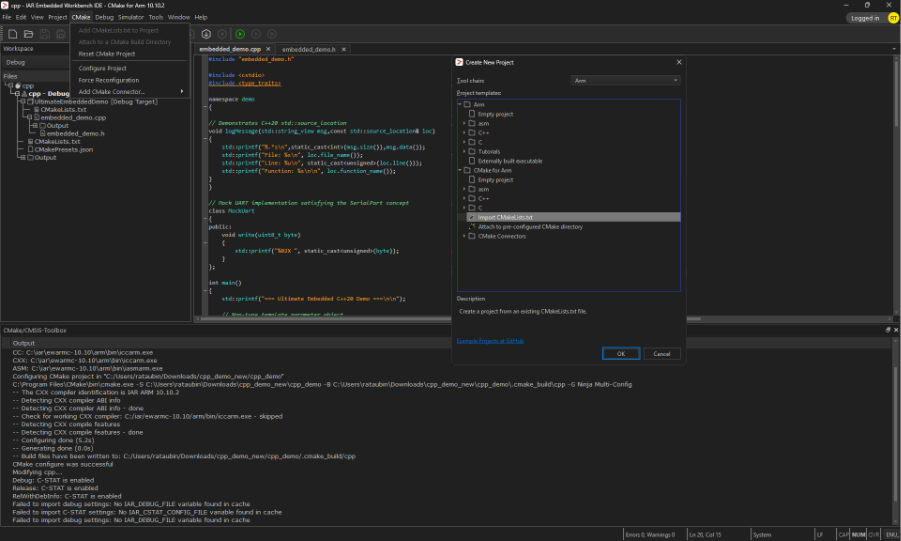
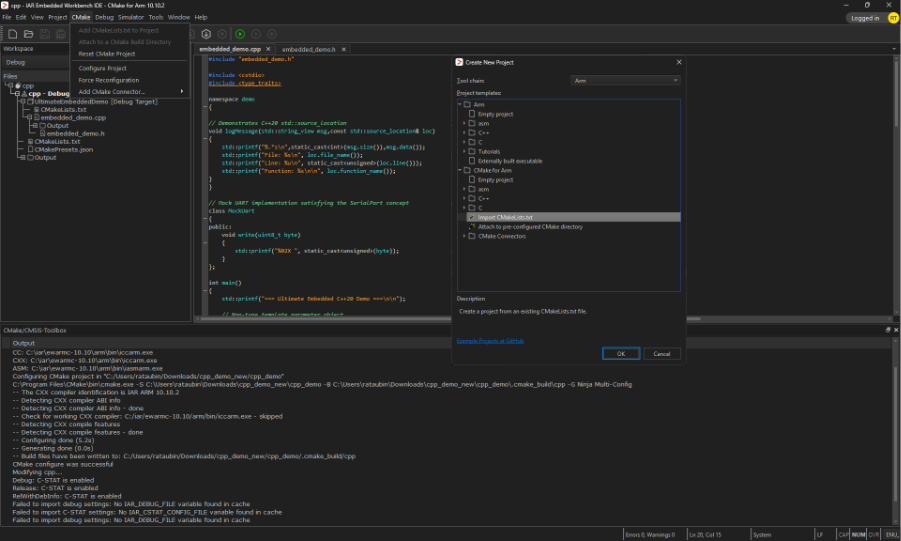 Figure 1: Screenshot of the IAR Embedded Workbench cross-platform IDE showing a CMake-based embedded project, including support for importing existing CMakeLists.txt files. Developers can bring existing CMake projects directly into a full-featured cross-platform environment for editing, building, debugging, and CI/CD integration while maintaining a single build configuration.
How Do You Run Static Analysis from a CMake Build?
In a CMake-based workflow, static analysis can be part of the build itself rather than a separate step someone has to remember.
In Zephyr, the ZEPHYR_SCA_VARIANT variable selects a static analysis tool as a CMake argument. Choosing IAR C-STAT adds analysis to the build command developers already run:
west build -b <board> -- -DZEPHYR_SCA_VARIANT=iar_c_stat
C-STAT then checks the code against MISRA C, MISRA C++, and CERT C/C++, and maps findings to CWE weakness classes. Rulesets, thread counts, and analyzer options are set through CMake variables, so the analysis configuration is versioned alongside the code and runs identically on every workstation and in every pipeline.
What Does a CMake-Based Workflow Mean for Your Team?
For developers, the benefit is immediate: one project, any operating system, any tool and no manual syncing of settings.
For engineering leaders, the value compounds over time. Every hour spent keeping duplicate configurations aligned, and every CI failure caused by drift between the IDE and the pipeline, is removed at the source. Onboarding gets faster too. CMake is widely known across the industry, so new engineers often arrive already able to read and extend the build, rather than learning a tool-specific format first.
A single, versioned build description is one of the core foundations of reproducible builds. Combined with a version-locked toolchain and controlled build environments, it lets a team rebuild the exact same binary years later, a requirement that matters more with regulations such as the Cyber Resilience Act.
Taken together, this is the direction embedded development is heading: one build description, many environments, and an IDE that fits into the workflow instead of defining it.
See It in Action
Try a CMake-first workflow with your own project or explore how the pieces fit together in the interactive IAR Platform demo